
InfoTrack integration for InTouch
Order conveyancing searches from your InTouch matter
Order searches from the matter and keep everything in one workflow. Track progress, receive results back on the file, and kick off SDLT and AP1 with less typing.
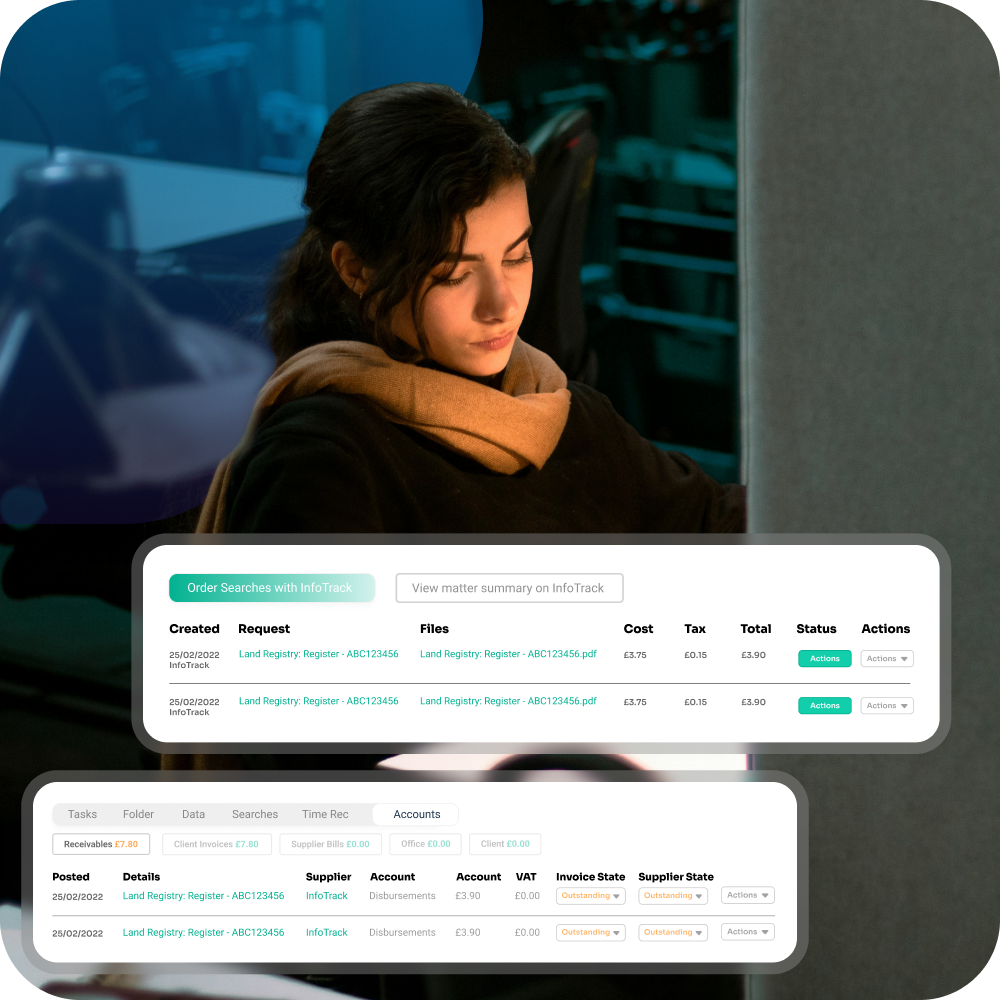
All your searches in one connected place
-
Order common searches like local authority, environmental, drainage and water, and coal mining reports, plus HM Land Registry searches when you need them.
-
Check what is ordered, pending, or complete without jumping between systems. Optional alerts if you want them.
-
Reports and certificates arrive back in InTouch. They land on the correct matter with clear names and timestamps, so anyone can follow the story.
-
Map provider fees once. InTouch can post them to disbursements or ledgers the way you like to work.
-
InfoTrack supports digital SDLT and AP1. Their system pre‑populates a lot of the form and runs smart checks to reduce slip ups. You kick this off from InTouch and keep the file tidy.
Why firms choose InfoTrack
Used across the industry
InfoTrack supports over half the conveyancing market, with around 25,000 users across England and Wales relying on it each day.
AP1 with checks that reduce mistakes
Digital AP1 includes validations that flag issues before you submit, which helps cut down on requisitions.
Recognised for innovation
InfoTrack is a multi-award-winning provider, including the King’s Award for Enterprise in the innovation category, the highest business award in the UK.
Post completion in one view
A dashboard brings together SDLT, OS priority and AP1 status so you can see what still needs attention.
Land Registry built in
Search HM Land Registry, pull titles and deeds, and use mapping to pinpoint the property.
Built to work with InTouch
When you order a search from a case in InTouch, InTouch fills in the details for you. InfoTrack sends the results back to that same case, and InTouch can add the fees to the right cost lines.

“We use InfoTrack for our search, Land Registry, and SDLT processes. The integration with InTouch allows for the automation of a number of manual tasks which enables us to concentrate on better serving our clients. I’d recommend InfoTrack to any firm looking to work in a more efficient and simpler way."
Tom Hansen, Fletcher Longstaff
Switching to InTouch?
Keep your InfoTrack account
Thinking about moving to InTouch? You don’t have to change search providers. If your team already uses InfoTrack, keep your account. Connect it once in InTouch and carry on ordering from the case.
Keep the InfoTrack login your team already knows
Keep using the same search bundles and pricing in InfoTrack
Link InfoTrack to InTouch once in settings, then order searches from new InTouch matters as normal
If you want older search results in InTouch, you can store those documents there too, using your usual document upload or filing process

APIs and webhooks to connect anything else
Enterprise customers can use our API and webhooks to connect InTouch with other systems and automate steps around key matter events. Trigger actions in InTouch from external tools, or trigger external workflows when something changes on a matter.
For example:
When search results are received on a matter, automatically create a review task, notify the fee earner, and send a short client update by email or SMS
When a matter reaches key milestones (searches ordered, results received, ready to exchange, completed), update your CRM or pipeline stage and post an internal Teams or Slack alert
FAQs About InTouch & Infotrack’s Integration
How do I connect my InfoTrack account to InTouch?
We connect the accounts, all you need to do is sign in once and start ordering!
Which InfoTrack services work in InTouch such as conveyancing searches, SDLT and digital AP1?
You can open InfoTrack from an InTouch matter to order conveyancing searches like local authority, environmental, drainage and water, and coal mining where needed. You can also run post completion steps like SDLT and digital AP1.
Does InTouch prefill InfoTrack forms from the matter details?
Yes. InTouch sends the key matter details to InfoTrack so you do not need to type them in again.
Do InfoTrack results and certificates auto file back to the InTouch matter?
Yes. When the order completes, the results are returned to the same InTouch matter and saved to the file.
Does the integration support OS1 and OS2 priority searches through InfoTrack from InTouch?
Yes, if OS1 and OS2 are enabled on your InfoTrack account. You can start them from the matter and keep the results saved back to the file.
Can we keep our InfoTrack bundles and pricing when we move to InTouch?
You keep using your existing InfoTrack account, so bundles and pricing stay under your agreement with InfoTrack.
Does the integration cover HM Land Registry items like titles, deeds and searches?
Yes. You can access HM Land Registry items through InfoTrack, and the documents can be saved back onto the InTouch matter.
Are InfoTrack fees and disbursements posted to our ledgers in InTouch?
Yes. You can map InfoTrack fees once, and InTouch can post them back to the matter as disbursements or cost lines automatically so the file and ledgers stay up to date.
What data security and retention does InfoTrack offer, for example ISO 27001?
InfoTrack states it uses AWS infrastructure described as ISO 27001 compliant and that data is stored for seven years. For full detail, refer to InfoTrack’s published security information.